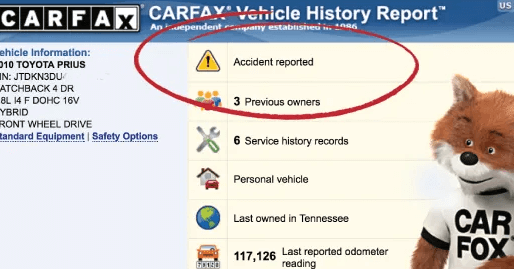

A Carfax report shows vehicle ownership history, accident records, mileage logs, title issues, maintenance entries, damage classifications, and more. It helps buyers verify a used car’s condition before purchase.
What Data Sources Does Carfax Use?
Carfax collects vehicle history data from over 112,000 trusted sources. These include insurance companies, DMV offices, police departments, service centers, automotive manufacturers, dealerships, auction houses, and vehicle inspection facilities. Each entry is linked to a specific VIN record.
✅ Even a cheap Carfax report uses these official databases. The price doesn’t affect the data integrity, only how the report is purchased.
Carfax Data sources include:
Insurance companies → accident claims and damage payouts
- DMVs → title status, transfers, and registration events
- Police departments → crash reports and incident logs
- Auto repair shops → oil changes, repairs, and inspections
- Dealerships → certified service, manufacturer warranties
- Auction houses → vehicle grading, damage disclosures
- Inspection services → mileage logs, emissions testing
Key Sections in a Carfax Report
Each Carfax report is structured into distinct sections. These help buyers evaluate a vehicle’s condition, legal status, usage pattern, and potential risk factors. Below are the core sections included in a full Carfax report.
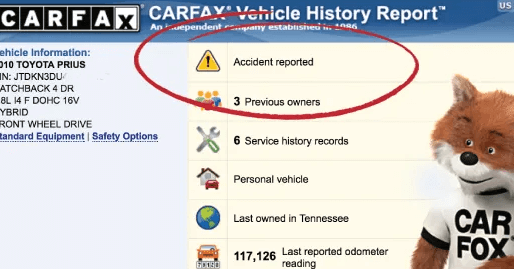
Ownership History: Number of Owners and Usage Type
Carfax shows how many owners a vehicle has had, including each ownership period, registration state, and transfer date. It also classifies usage type as personal, fleet, rental, or lease, which can indicate the level of wear or risk involved.
Odometer Readings and Rollback Detection
Carfax logs chronological mileage records from service visits, title transfers, inspections, and emissions tests. It flags odometer rollbacks, inconsistencies, or missing data points. Accurate mileage helps buyers detect fraud and assess vehicle wear over time.
Title Status and Branding
Carfax identifies title designations assigned by state DMVs. These include clean, salvage, rebuilt, junk, flood, or lemon titles. Reports may also list lien records, repossession events, and buybacks. Title branding directly affects a vehicle’s legal status and resale value.
Accident and Damage Records
Carfax details all reported collisions, including the date, location, and impact type (front, rear, side). It flags whether airbags deployed, if the vehicle was towed, and classifies damage as minor, moderate, or major. See what “minor damage” means on a Carfax report.
Maintenance and Service History
Carfax includes records of routine maintenance such as oil changes, brake inspections, tire rotations, and fluid replacements. It logs reported repairs by participating dealerships, repair shops, and quick-lube centers, helping buyers confirm regular upkeep and spot service gaps.
Open Recalls
Carfax reports any manufacturer-issued safety recalls linked to the vehicle’s VIN. It shows the defect type, affected component, and repair status—whether the recall was completed, pending, or ignored. Open recalls may affect safety and legal registration in some states.
Does a Cheap Carfax Report Show All of This?
✅ Yes — a genuine Carfax report, even if purchased at a discount, contains the full dataset from Carfax’s official sources.
❌ No — reports from resellers using scraped or partial data may lack key sections like maintenance history, title branding, or accident records.
What Carfax Might Not Show
Carfax only reports events documented by official sources. It may not include:
- Unreported accidents without insurance claims or police reports
- Maintenance done by independent mechanics not connected to reporting networks
- Private repairs or upgrades with no digital record
- Title fraud or delays in DMV reporting
- Out-of-country history, especially if imported from non-U.S. regions
Buyers should treat Carfax as a verified summary—not a complete record.
How to Verify a Carfax Report’s Accuracy
Buyers can validate Carfax data by cross-referencing with other sources:
- Use the VIN to check NMVTIS, AutoCheck, or VinAudit
- Request maintenance receipts or service records from the seller
- Get a pre-purchase inspection from an ASE-certified mechanic
- Compare title transfer dates and mileage logs across state DMV records
- Look for inconsistencies between physical condition and reported history
Verification reduces risk when the Carfax report appears incomplete or limited
Sample Carfax Report: Visual Walkthrough
Viewing a sample Carfax report helps buyers understand how vehicle history is displayed. Key visual sections include:
- Ownership summary with dates, states, and use type
- Damage and accident records with severity indicators
- Service log showing maintenance intervals and repairs
- Title branding and recall notices
🔗View the sample Carfax PDF here
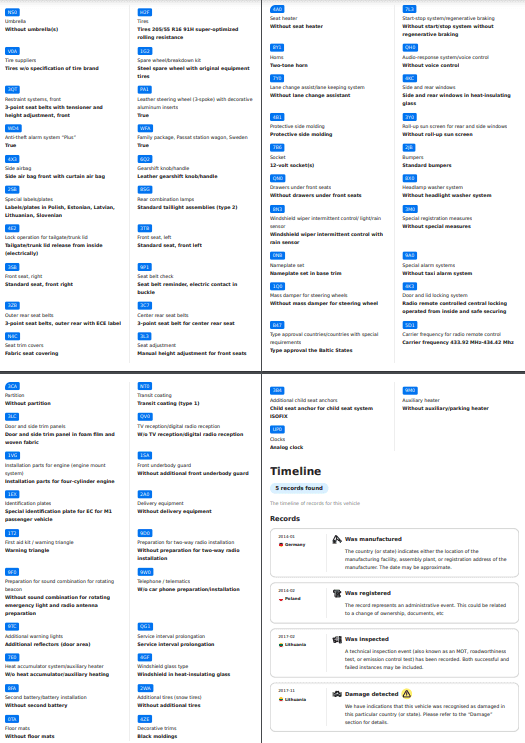
Use this as a reference when reviewing your own report or comparing providers.
FAQs: What Carfax Reports Include
| Question | Snippet-Ready Answer |
|---|---|
| Does Carfax show minor damage? | Yes, Carfax reports include minor damage if it’s reported by insurers or shops. |
| Does Carfax show service history? | Yes, if service was logged by a participating shop or dealer. |
| Does Carfax show every accident? | No. It only includes reported incidents. Unreported repairs may be missing. |
| Do cheap Carfax reports show full data? | Yes, if purchased legally from Carfax or verified resellers. |
| Does Carfax show flood or fire damage? | Yes, if the title is branded or an insurance claim was made. |
Next: Is a Cheap Carfax Report Legit?
A discounted Carfax report can still be legitimate if purchased from an authorized reseller or group buy provider. The report content remains identical to full-price versions.
Call to Action: Learn how to verify Carfax sources and avoid scams while still saving money on full-access reports.